2026 में सीखने वाली 10 Digital Skills: Future Career के लिए कौन-सी Skills सीखें?
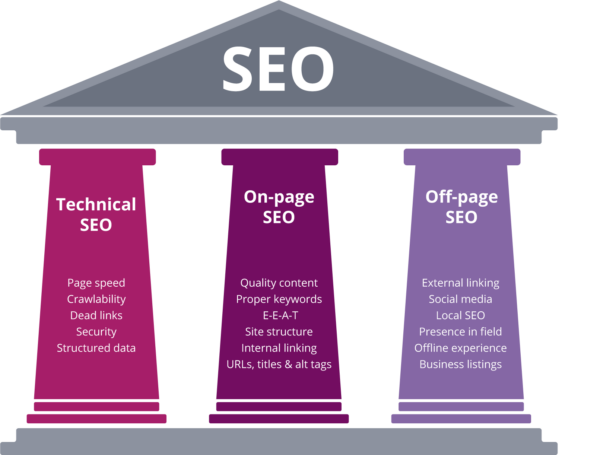
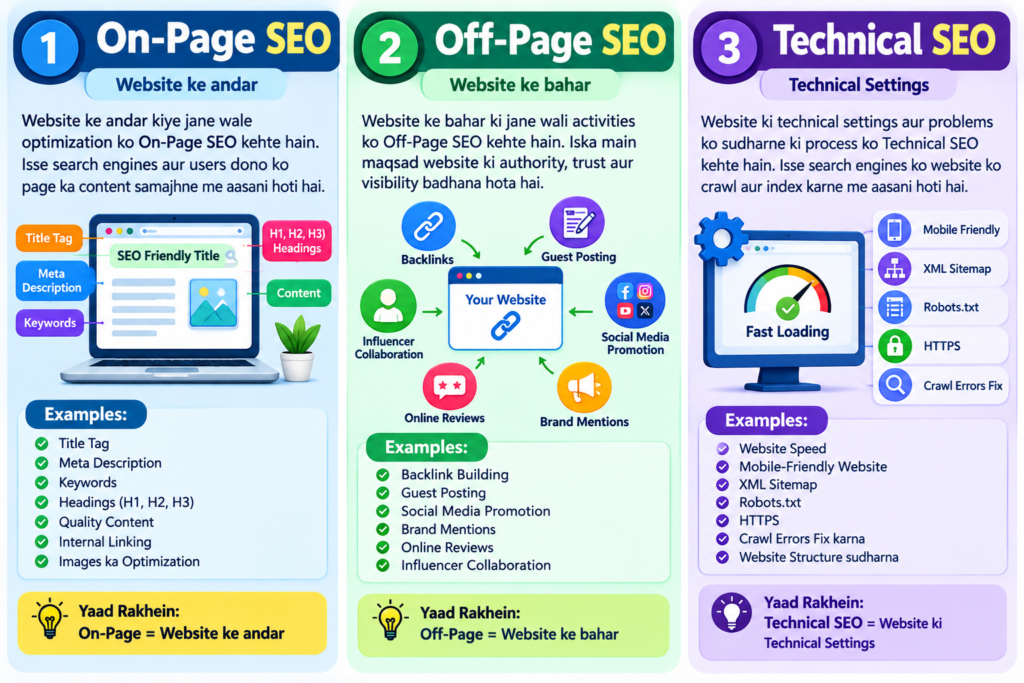
# 2026 में सीखने वाली 10 Digital Skills: Future Career के लिए कौन-सी Skills सीखें? डिजिटल दुनिया में career बनाने के लिए हर tool सीखना जरूरी नहीं; सही skill चुनकर लगातार अभ्यास करना ज्यादा काम आता है। 2026 में AI, online business, data, security और engaging content की जरूरत अलग-अलग क्षेत्रों में दिखती है। इस guide में दस skills का अर्थ, सीखने के विषय, शुरुआती रास्ता, tools और practical career या freelance उपयोग सरल Hindi/Hinglish में दिए गए हैं। समय के अनुमान व्यक्ति के अभ्यास, पहले के अनुभव और project की जटिलता के अनुसार बदलेंगे—ये नौकरी की गारंटी नहीं हैं। ## 1. AI और Generative AI AI ऐसे systems और methods का व्यापक क्षेत्र है जो data से patterns सीखकर prediction, classification या content-generation जैसे काम करते हैं। Generative AI text, images, audio या code के drafts बना सकता है। यह research, customer support, planning और repetitive work को तेज कर सकता है, लेकिन output में गलती, bias या गोपनीयता का जोखिम रहता है। इसलिए इंसानी जाँच जरूरी है। **क्या सीखें:** AI की बुनियादी समझ, machine learning के concepts, generative models, responsible use, data privacy और output evaluation। **शुरुआत:** पहले रोजमर्रा के use-cases पहचानें, फिर एक text या image assistant के साथ छोटे tasks करें; उसके बाद किसी काम का before/after workflow बनाएं और परिणाम जाँचें। **Tools:** ChatGPT, Microsoft Copilot, Gemini जैसे assistants; आगे चलकर Python और APIs। उपलब्धता और features बदल सकते हैं। **उपयोग/किसके लिए:** AI-assisted research, content drafts, support workflows और product prototypes में मदद। तकनीक में रुचि रखने वाले, writers, analysts और operations professionals के लिए उपयोगी। ## 2. Digital Marketing Digital marketing इंटरनेट के माध्यम से किसी product, service या संस्था को सही audience तक पहुँचाने और परिणाम मापने की प्रक्रिया है। इसमें strategy, content, search, email और paid campaigns शामिल हो सकते हैं। यह छोटे व्यवसायों को भी चुने हुए ग्राहक-वर्ग तक पहुँचने में मदद देता है। **क्या सीखें:** audience research, funnel, value proposition, content planning, campaign basics, analytics, consent और budget discipline। **शुरुआत:** एक काल्पनिक या स्थानीय business चुनें, audience और उद्देश्य लिखें, एक महीने का content plan बनाएं और सफलता के माप तय करें। **Tools:** Google Analytics, Google Ads, Meta Business Suite, email platforms और spreadsheets; हर platform की नीतियाँ समझें। **उपयोग/किसके लिए:** campaign assistant, marketing coordinator, consultant या छोटे व्यवसाय के लिए promotion। संचार, business और प्रयोग-आधारित काम पसंद करने वालों के लिए। ## 3. SEO Search Engine Optimization (SEO) वेबसाइट की उपयोगिता, सामग्री और तकनीकी गुणवत्ता सुधारने का काम है ताकि खोज प्रणाली पृष्ठों को समझ सके और उपयोगकर्ता को उपयोगी परिणाम मिलें। रैंकिंग की गारंटी नहीं दी जा सकती; search systems और प्रतिस्पर्धा बदलती रहती है। **क्या सीखें:** search intent, स्पष्ट और मौलिक लेखन, crawl/index की बुनियाद, internal linking, page experience, structured data की सीमाएँ और measurement। **शुरुआत:** एक विषय चुनें, पाठक का सवाल समझें, उपयोगी page लिखें और Search Console में उपलब्ध संकेतों को पढ़ना सीखें। **Tools:** Google Search Console, Analytics, PageSpeed Insights और keyword research tools। Google की आधिकारिक [Search documentation](https://developers.google.com/search/docs/) देखें। **उपयोग/किसके लिए:** content SEO, technical SEO, audit और छोटे व्यवसायों की organic visibility। लेखन और विश्लेषण दोनों पसंद करने वालों के लिए। ## 4. Data Analytics Data analytics कच्चे data को साफ करके सवालों के उत्तर और निर्णय के लिए उपयोगी निष्कर्ष निकालना है। कंपनियाँ बिक्री, ग्राहक व्यवहार, संचालन और product performance समझने के लिए इसका उपयोग करती हैं। **क्या सीखें:** spreadsheets, data cleaning, descriptive statistics, charts, SQL, dashboard design और निष्कर्षों की सावधानीपूर्वक व्याख्या। **शुरुआत:** सार्वजनिक या स्वयं बनाया छोटा dataset लें, प्रश्न तय करें, साफ करें, pivot/chart बनाएं और एक पृष्ठ का निष्कर्ष लिखें। **Tools:** Excel/Google Sheets, SQL, Power BI या Tableau; आगे Python उपयोगी हो सकता है। **उपयोग/किसके लिए:** reporting, business analysis, product insights और freelance dashboard projects। जिज्ञासु, व्यवस्थित और detail-oriented लोगों के लिए। ## 5. Cybersecurity Cybersecurity devices, networks, accounts और data को unauthorized access, misuse और disruption से बचाने के तरीके हैं। डिजिटल सेवाएँ बढ़ने के साथ सुरक्षित configuration और जोखिम की समझ हर संगठन के लिए महत्वपूर्ण है। अभ्यास हमेशा अपने lab या स्पष्ट अनुमति वाले environment में करें। **क्या सीखें:** networking, operating systems, authentication, access control, threat modeling, secure coding और incident response की बुनियाद। **शुरुआत:** मजबूत account security और networking fundamentals से शुरू करें; फिर सुरक्षित virtual lab में beginner exercises करें और हर अभ्यास का दस्तावेज बनाएं। **Tools:** Linux, Wireshark, OWASP resources और virtual machines। Microsoft Learn पर सुरक्षा संबंधी learning paths उपलब्ध हैं: [Microsoft Learn](https://learn.microsoft.com/). **उपयोग/किसके लिए:** security operations, compliance support, vulnerability management (अनुमति के साथ) और सुरक्षित systems design। धैर्यवान, नैतिक और जाँच-पड़ताल पसंद करने वालों के लिए। ## 6. Web Development Web development वेबसाइट और web applications बनाने व बनाए रखने का काम है। Front-end उपयोगकर्ता को दिखने वाले हिस्से पर, back-end server और data पर केंद्रित होता है; कई भूमिकाएँ दोनों जोड़ती हैं। **क्या सीखें:** HTML, CSS, JavaScript, responsive design, accessibility, Git, APIs और मूल security। **शुरुआत:** एक साधारण responsive personal page बनाएं, फिर form या छोटा interactive feature जोड़ें; code को version control में रखें और project deploy करना सीखें। **Tools:** VS Code, browser devtools, Git/GitHub और hosting platforms। **उपयोग/किसके लिए:** junior developer, website maintenance, landing pages और छोटे freelance builds। समस्या हल करना और लगातार सीखना पसंद करने वालों के लिए। ## 7. UI/UX Design UI (User Interface) स्क्रीन के दृश्य और interactive हिस्से हैं; UX (User Experience) यह देखता है कि पूरा अनुभव कितना स्पष्ट और सहज है। अच्छा design सुंदरता के साथ उपयोगकर्ता की जरूरत, accessibility और usability को जोड़ता है। **क्या सीखें:** user research, personas की सीमाएँ, information architecture, wireframes, prototyping, usability testing, visual hierarchy और accessibility। **शुरुआत:** किसी सामान्य task को चुनें, उपयोगकर्ता की परेशानी समझें, सरल wireframe बनाएं, कुछ लोगों से परीक्षण कर feedback के आधार पर सुधारें। **Tools:** Figma, FigJam और prototyping tools। **उपयोग/किसके लिए:** product design, UX research support, interface design और design handoff। दृश्य सोच, सहानुभूति और feedback से सुधार पसंद करने वालों के लिए। ## 8. Video Editing और Content Creation Content creation में उपयोगी या मनोरंजक सामग्री की योजना, निर्माण और प्रस्तुति आती है; video editing footage को काटकर,